01
ABQARI Restaurants
Follow orders. Know your stock.
See order states and physical stock, with an alert threshold for each item.
Remaining quantities and alert thresholds
ABQARIعبقريThe ABQARI business software family
Follow restaurant orders and stock, and let guests order from your menu. Explore Dawrak’s queue and pickup experience.
Explore the systems
Guests see prices, choose items and select their extras.
 On-hand quantity

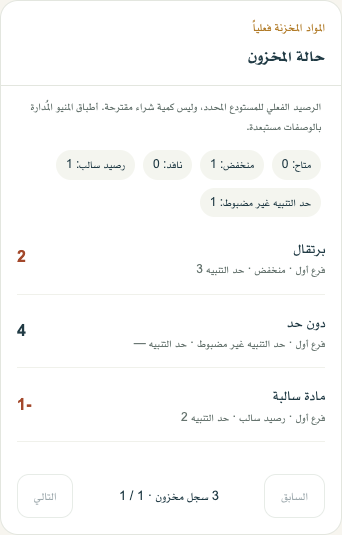
See remaining quantities and items below their alert threshold.
The ABQARI family / 01—03
Restaurant orders, your guest menu and pickup status. Explore each experience.
ABQARI Restaurants
See order states and physical stock, with an alert threshold for each item.
Remaining quantities and alert thresholds
ABQARI Store
An online restaurant menu with items, prices and extras that receives guest orders.
Items, choices and prices

Dawrak
Explore how a guest follows their turn number and order status through to pickup.
Turn number and pickup state
RESTAURANT OPERATIONS
Your team knows what to do next. You keep the whole picture in view.
Take orders, select tables and add-ons, and manage the bill from your point of sale.
Send orders to the kitchen display and follow their progress until they’re ready.
Connect menu items to recipes and keep track of ingredients, waste and preparation costs.
ONLINE ORDERING
A dedicated website shows the items you choose to publish. Guests place an order, and your team receives it in ABQARI.
Manage your name, description, items and publishing from your restaurant dashboard.
Delivery or pickup, according to your restaurant settings. Delivery eligibility and fees depend on the address and zone.
ACCOUNT & ACTIVATION
Create your account and add your restaurant details.
We contact you to review your needs and subscription steps.
Add items and your team, ready to start after account activation.
Use your restaurant link, username and password.
After we review your request and contact you to arrange subscription and activation.
They open your restaurant menu, choose items and extras, then send an order to your team.
Manage restaurant items, prices and what guests see from your restaurant dashboard.
Guests see the methods you enable. For delivery, the store checks the address and displays the area fee.
We review your request and contact you to arrange setup.